How to choose fleet management software
To choose fleet management software, start with practical needs: vehicles, drivers, maintenance, documents and costs. Then compare usability, compatibility, data protection, total cost and support. Telematics functions are not included in every package and may require separate equipment or a subscription.
In this guide
- Examples of tools mentioned in the original article
- Choosing fleet management software: features
- Choosing fleet management software: ease of use
- Choosing fleet management software: compatibility
- Choosing fleet management software: security
- Choosing fleet management software: cost
- Choosing fleet management software: customer support
First published on 1 March 2023; reviewed on 2 November 2026. The original examples and screenshots are historical; check current offerings for modules and commercial terms. CNIL resources concern the French framework.
To choose fleet management software, start with practical needs: vehicles, drivers, maintenance, documents and costs. Then compare usability, compatibility, data protection, total cost and support. Telematics functions are not included in every package and may require separate equipment or a subscription.
Examples of tools mentioned in the original article
- GAC Car Fleet by GAC Technology
- FleetWave by Chevin
- Odoo Fleet
- FleetNote by FleetNote
- CodeNekt for Fleet
- These historical examples are neither a ranking nor an exhaustive list. Check each publisher’s current offering.
Managing your fleet matters whatever the size of your business. It is a complex, specialised task requiring tools suited to your objectives, resources and vehicles.
To choose a tool that meets your expectations, identify your needs clearly and use them to guide your decision.
This article examines the main factors to consider when selecting fleet management software.
Choosing fleet management software: features
Depending on the package, software may offer vehicle records, maintenance tracking, documents, costs or telematics. Check the included modules, optional extras and data actually available for your vehicles.
For example, if you need to optimise drivers’ routes, look for a tool with route-planning functionality.
GPS location, where offered and activated within an appropriate framework, shows the position of equipped vehicles. Do not confuse it with an administrative fleet file; also examine the conditions for collecting and accessing data.
Maintenance tracking can centralise deadlines, completed work and supporting documents. Automatic tyre-pressure, fuel or component monitoring requires compatible data and equipment; administrative software alone does not mechanically diagnose a vehicle.
Driving-time tracking depends on the package and data sources. Check your activity’s specific needs; a dashboard alone does not guarantee compliance with every applicable rule.
Route management allows efficient planning that takes account of time constraints, distance and workload. It can help reduce unnecessary journeys and delays.
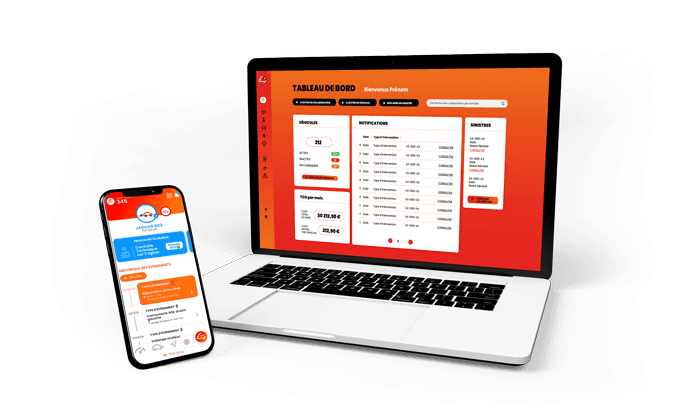
CodeNekt for Fleet example: this solution addresses small and medium fleet management needs. First decide whether you want administrative tracking or connected functions as well. Check the product website for current modules, equipment and conditions.
- 🧑🦱 Employee management
- 🚀 Vehicle management
- 🚨 Claims management
- 🧰 Administrative and maintenance deadline notifications
- Employee participation in keeping information up to date
- 💶 Overall fleet cost
Choosing fleet management software: ease of use
A difficult tool can frustrate drivers and managers and reduce productivity if functions are complex or take too long to set up.
Look for a friendly interface that all users can understand easily.

Choosing fleet management software: compatibility
Compatibility with your vehicles
Make sure the tool is compatible with your company’s vehicles. Some solutions work with GPS-equipped vehicles; others may require additional hardware.
Compatibility with your administrative tools
Also check compatibility with the software and systems you already use, such as accounting or human resources tools.
Choosing fleet management software: security
Distinguish data security from road-safety functions. Ask how access, hosting, backups and data exports are managed. Driving alerts and event detection depend on modules and equipment; they are not universal features.
Choosing fleet management software: cost
Costs vary with features and the number of vehicles covered. Some tools are billed monthly, others sold under a licence. Consider your budget and compare value for money.
Choosing fleet management software: customer support
Installation, onboarding and maintenance will bring you into contact with support. Review the quality of that service. Attractive features and prices are of little use if you cannot install the application and support does not respond.
Compare each solution against your actual needs: features, usability, compatibility, data protection, cost and support. A demonstration based on your own use cases helps assess suitability without assuming that every package does the same thing.
Reduce fleet costs for small businesses.
Plan vehicle maintenance tracking.
France Num: compare fleet management softwareOpens external site.
CNIL: vehicles and drivers at work, French frameworkOpens external site.
CodeNekt App
Keep vehicle information organized.
Centralize vehicle documents, reminders and history from your phone.
Download the appRelated articles
Keep reading